


2024 Provide Updated Fortinet FCP_FAZ_AD-7.4 Dumps as Practice Test and PDF
FCP_FAZ_AD-7.4 Dumps are Available for Instant Access
NEW QUESTION # 19
After you have moved a registered logging device out of one ADOM and into a new ADOM, you run the following command: execute sql-local rebuild-adom <new-ADOM-name> What is the purpose of running this CLI command?
- A. To remove the analytics logs of the device from the old database
- B. To migrate the archive logs to the new ADOM
- C. To populate the new ADOM with analytical logs for the moved device, so you can run reports
- D. To reset the ADOM disk quota enforcement to its default value
Answer: C
Explanation:
When you move a registered logging device from one ADOM (Administrative Domain) to another in FortiAnalyzer, it's essential to ensure that the analytical logs for the moved device are available in the new ADOM to maintain continuity in reporting and log analysis. The command execute sql-local rebuild- adom <new-ADOM-name> is used specifically for this purpose. Running this command populates the new ADOM with the analytical logs of the moved device, enabling you to generate accurate and comprehensive reports based on the historical data of the device in its new ADOM context. This process ensures that the transition of devices between ADOMs does not lead to a loss of analytical insight or reporting capabilities for the device's traffic and events.
NEW QUESTION # 20
Which statement is true about ADOMs?
- A. You can change the ADOM mode only through the GUI.
- B. When a FortiAnalyzer Fabric is implemented, the default ADOM mode is set to advanced.
- C. In normal mode, you cannot change the disk quota of the ADOM after its creation.
- D. A fabric ADOM can include all the device types supported by FortiAnalyzer.
Answer: D
Explanation:
Regarding ADOMs (Administrative Domains) in FortiAnalyzer, a fabric ADOM is capable of including all device types that FortiAnalyzer supports. This is part of the flexibility offered by ADOMs to manage and report on logs from various devices within a Fortinet security fabric. ADOMs can be enabled to support non-FortiGate devices as well, and the root ADOM in Fabric ADOMs provides visibility into all Security Fabric devices. Additionally, it should be noted that in normal mode, you cannot assign different FortiGate VDOMs to different ADOMs, while in advanced mode, you can, which provides a more granular control over the log data from individual VDOMs.
Reference: FortiAnalyzer 7.4.1 Administration Guide, "ADOMs" and "ADOM device modes" sections.
NEW QUESTION # 21
You finished registering a FortiGate device. After traffic starts to flow through FortiGate. you notice that only some of the logs expected are being received on FortiAnalyzer.
What could be the reason for the logs not arriving on FortiAnalyzer?
- A. This FortiGate model is not fully supported.
- B. FortiGate was added to the wrong ADOM type.
- C. FortiGate does not have logging configured correctly.
- D. This FortiGate is part of an HA cluster but it is the secondary device.
Answer: C
Explanation:
This FortiGate is part of an HA (High Availability) cluster, but it is a secondary device. In an HA configuration, typically only the primary device is responsible for sending logs to FortiAnalyzer, while the secondary device may not send logs unless the primary device fails.
NEW QUESTION # 22
Which two settings must you configure on FortiAnalyzer to allow non-local administrators to authenticate on FortiAnalyzer with any user account in a single LDAP group? (Choose two.)
- A. One or more remote LDAP servers
- B. An administrator group
- C. A local wildcard administrator account
- D. LDAP servers IP addresses added as trusted hosts
Answer: A,B
Explanation:
To allow non-local administrators to authenticate on FortiAnalyzer with any user account in a single LDAP group, you must configure one or more remote LDAP servers and an administrator group. First, you configure the LDAP server(s) by specifying the server name, IP, and other details such as the Common Name Identifier and Distinguished Name. Then, you add the LDAP server to a user group.
Finally, you create an administrator account that uses this user group for authentication, allowing any user from the specified LDAP group to authenticate.
Reference: FortiAnalyzer 7.2 Administrator Guide, "Configuring remote authentication for administrators using LDAP" section.
NEW QUESTION # 23
Which two methods can you use to restrict administrative access on FortiAnalyzer? (Choose two.)
- A. Use administrator profiles.
- B. Fabric connectors to external LDAP servers.
- C. Limit access to specific virtual domains.
- D. Configure trusted hosts.
Answer: A,D
Explanation:
To restrict administrative access on FortiAnalyzer, two effective methods are using administrator profiles and configuring trusted hosts. Administrator profiles allow for defining the level of access and permissions for different administrators, controlling what each administrator can see and do within the FortiAnalyzer unit. Configuring trusted hosts enhances security by limiting administrative access to specified IP addresses, ensuring that administrators can only connect from approved locations or networks, thus preventing unauthorized access from outside specified subnets or IP addresses.
Reference: FortiAnalyzer 7.4.1 Administration Guide, "Administrators" and "Trusted hosts" sections.
NEW QUESTION # 24
An administrator has configured the following settings: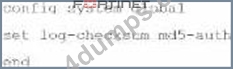
What is the purpose of executing these commands?
- A. To record the hash value and authentication code of log files.
- B. To encrypt log transfer between FortiAnalyzer and other devices.
- C. To verify the integrity of the log files received.
- D. To create the secure channel used by the OFTP process.
Answer: C
Explanation:
The purpose of executing the provided CLI commands, which include setting the log-checksum to md5- auth, is to ensure the integrity of the log files. This setting is used to record the MD5 hash value of log files, which is a widely used cryptographic hash function that produces a 128-bit (16-byte) hash value. By using MD5 authentication, FortiAnalyzer ensures that the log files have not been altered or tampered with during transit, thereby verifying their integrity upon receipt. This is not related to encrypting log transfers, scheduling reports, or creating secure channels for OFTP (Over-the-FortiGate Protocol) processes.
NEW QUESTION # 25
Which items must you configure on FortiAnalyzer to send its reports to an external server?
- A. Report schedule
- B. Fabric connector
- C. Mail server
- D. Output profile
Answer: D
Explanation:
To send reports from FortiAnalyzer to an external server, you must configure the output profile. This involves specifying the method (FTP, SFTP, or SCP), server IP, username, password, and the directory where the report will be saved. Additionally, you have the option to delete the report after it has been uploaded to the server.
Reference: FortiAnalyzer 7.2 Administrator Guide, "Enable uploading of generated reports to a server" section.
NEW QUESTION # 26
Refer to the exhibit.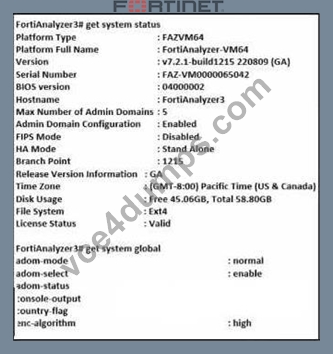
Based on the partial outputs displayed in the exhibit, which devices are ready to be configured as peers in an HA cluster?
- A. FortiAnalyzer1 and FortiAnalyzer2
- B. These devices cannot participate in the same cluster.
- C. FortiAnalyzer1 and FortiAnalyzer3
- D. FortiAnalyzer2 and FortiAnalyzer3
Answer: B
Explanation:
Based on the provided exhibit, which shows partial outputs of the system status and global settings for FortiAnalyzer devices, the devices cannot be configured as peers in an HA (High Availability) cluster.
This is indicated by the HA Mode status being set to 'Stand Alone' for the displayed FortiAnalyzer device.
For devices to be part of an HA cluster, they would need to have compatible HA configurations, and usually, they should not be in 'Stand Alone' mode. Additionally, the exhibit only shows information for one FortiAnalyzer, so it cannot be determined if there is another device ready to form an HA cluster with it.
NEW QUESTION # 27
Which two statements about FortiAnalyzer operating modes are true? (Choose two.)
- A. When in analyzer mode. FortiAnalyzer supports event management and reporting features.
- B. When in collector mode. FortiAnalyzer offloads the log receiving task to the analyzer.
- C. For the collector, you should allocate most of the disk space to analytics logs.
- D. Analyzer mode is the default operating mode.
Answer: B,C
Explanation:
The default operating mode for FortiAnalyzer is analyzer mode. In this mode, FortiAnalyzer provides full functionality for event management and reporting features. This mode is intended for environments where comprehensive analysis and reporting are required. It allows FortiAnalyzer to collect, analyze, and store logs, as well as generate reports and manage events.
Reference: FortiAnalyzer 7.4.1 Administration Guide, "Operating modes" section.
NEW QUESTION # 28
Which two statements are true regarding fabric connectors? (Choose two.)
- A. Using fabric connectors is more efficient than third-party polling information from the FortiAnalyzer API
- B. Fabric connectors allow you to save storage costs and improve redundancy.
- C. The storage connector service does not require a separate license to send logs to the cloud platform.
- D. Cloud-out connectors allow you to send real-time logs to public cloud accounts like Amazon S3.
Answer: A,B
Explanation:
Using fabric connectors is more efficient than third-party polling information from the FortiAnalyzer API - Fabric connectors are designed to integrate directly with the security fabric components and other services, which allows them to operate more efficiently compared to using third-party applications to poll information via APIs. APIs often involve more overhead due to the need for frequent polling and data retrieval operations, which can be resource-intensive.
Cloud-out connectors allow you to send real-time logs to public cloud accounts like Amazon S3. - Cloud- out connectors are specifically designed to facilitate the direct and real-time transfer of logs and other data to cloud services like Amazon S3. These connectors streamline the process by providing a built-in mechanism that bypasses the need for additional scripting or manual configuration.
NEW QUESTION # 29
Which statement is true about using aggregation mode on FortiAnalyzer?
- A. In aggregation mode, logs and content files are forwarded in real time.
- B. Aggregation mode can be configured only on the CLI.
- C. Aggregation mode can work with syslog servers.
- D. Aggregation mode supports log filters.
Answer: A
Explanation:
Aggregation mode allows FortiAnalyzer to collect and forward logs to another FortiAnalyzer or Syslog server in real time. This is useful for log data management in large deployments or distributed network environments.
NEW QUESTION # 30
Which FortiAnalyzer command erases all device settings, images, databases, and logs on disk, but preserves The network configuration?
- A. execute reset all-except-ip
- B. execute format disk
- C. execute formatlogdisk
- D. execute factory-reset
Answer: A
Explanation:
On FortiAnalyzer, the command to wipe all device settings, mirrors, databases, and disks, but preserve the network configuration, is: execute reset all-except-ip This command resets the FortiAnalyzer device to factory settings, but preserves network configurations such as IP addresses, gateways, and other network interface settings. This allows the device to remain accessible and reconfigured over the network after a reset.
NEW QUESTION # 31
Which process caches logs on FortiGate when FortiAnalyzer is not readable?
- A. logfiled
- B. miglogd
- C. sqlplugind
- D. oftpd
Answer: B
Explanation:
The process logfiled in FortiGate units with an SSD disk is responsible for buffering logs when FortiAnalyzer is unreachable. If the connection to FortiAnalyzer is lost and the memory log buffer is full, logfiled allows logs to be buffered on disk. These logs are then sent to FortiAnalyzer once the connection is restored. This reliable logging mechanism ensures that logs are not lost during periods when FortiAnalyzer is not reachable, thereby maintaining log integrity and continuity.
Reference: FortiOS 7.4.1 Administration Guide, "Log Buffering" and "Reliable Logging" sections.
NEW QUESTION # 32
......
Updated FCP_FAZ_AD-7.4 Dumps Questions For Fortinet Exam: https://passguide.vce4dumps.com/FCP_FAZ_AD-7.4-latest-dumps.html